Connections overview
A connection lets an agent use a server, a web API or a database while Corvid keeps the password. The agent names the connection. Corvid runs the operation with the saved secret and returns the result. Secrets never reach a Claude session.
Connectors and connections#
Corvid uses two layers.
- A connector is a definition. It says which hosts or databases it may reach, which operations it offers, and whether each operation reads, writes or is administrative. It holds the names of the secrets it needs, never their values. It is data only, with a version number.
- A connection is your instance of a connector. It has a name, its settings (like a host and a port), the secrets you typed in, a safety level and the projects it is linked to.
Corvid has these built-in connectors:
- SSH server, for commands and file uploads on a server. See SSH servers.
- HTTP API, for web APIs. See HTTP API connections.
- PostgreSQL, MySQL / MariaDB, SQL Server and SQLite file. See Database connections.
You can add a connector of your own from a file, and agents can propose one. See Connectors proposed by agents.
Which agents can use a connection#
An agent only sees connections linked to its own project. A connection linked to no project is seen by no agent.
Link a connection to the fewest projects that need it. Every agent in a linked project can call it, under the connection's safety level.
The Connections tab#
Open it with Ctrl+7 (Cmd+7 on macOS). It has four tabs and a button:
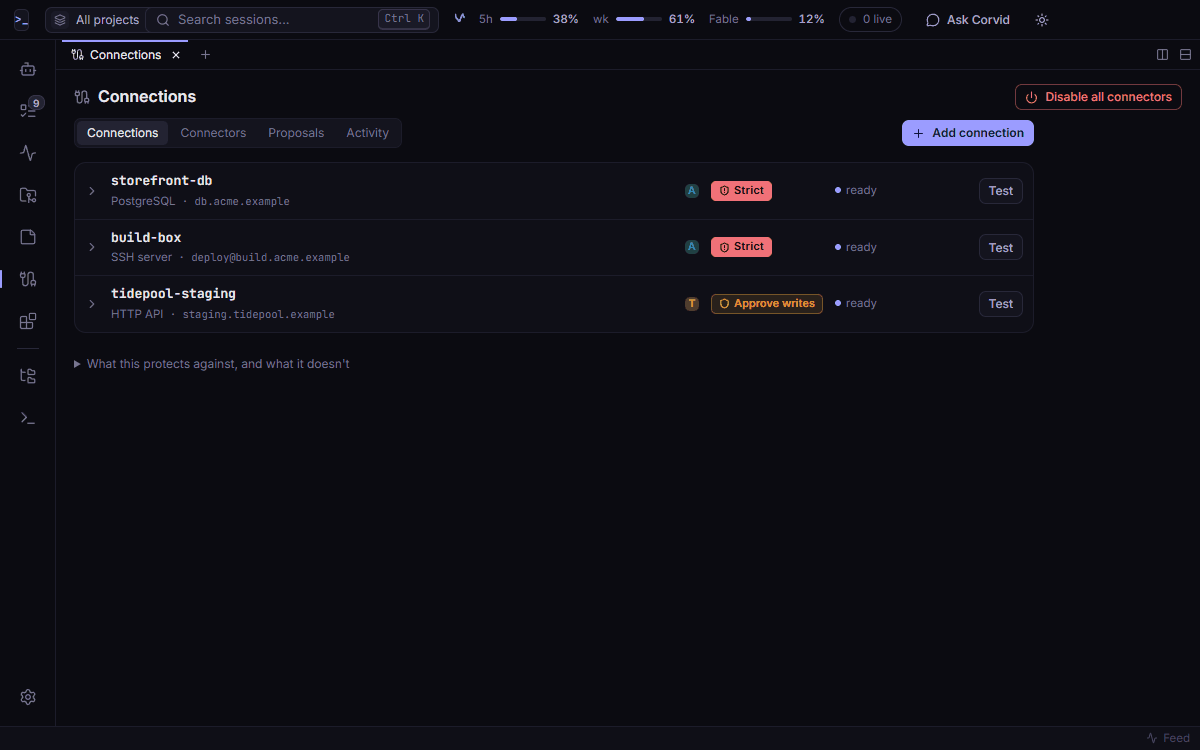
- Connections: one card per connection. A card shows the type, the target, whether each secret is set, the safety level, the linked projects, the last use and the status. Expand a card to edit it, replace or clear a secret, test it, see its recent activity, or delete it.
- Connectors: the definitions, with version, origin, status and operations by class. Approve, disable or enable a connector, read its manifest, or add one with Add a connector.
- Proposals: connectors that agents drafted, and connections they asked you to set up.
- Activity: calls that wait for your approval, then the audit log.
- Add connection: the wizard for a new connection.
The header has Disable all connectors, the kill switch. See The kill switch.
Add a connection#
Before you start, the connector must be approved and switched on. The wizard does not offer one that waits for approval or is switched off. Approve it under Connectors first.
- Open the Connections tab and click Add connection. You see 1 · Choose a connector.
- Click a connector. You see four steps: Settings, Secrets, Safety and projects and Review.
- Under Settings, type a Name. Agents use this name. It takes letters, digits and the characters
.,-and_. Fill in the connector's other settings. - Click Next. Under Secrets, type each secret the connection needs.
- Click Next. Under Safety and projects, pick a Safety level and click the projects to link under Linked projects. Strict is picked for you.
- Click Next. Review shows what the connector can do, the name, the safety level, the number of projects and the number of secrets set.
- Click Add connection. The new connection's card shows under Connections.
To add an SSH server, pick SSH server in step 2. It opens the New SSH server form instead of the four steps.
How secrets are kept#
- Corvid encrypts each secret with the system's secure storage for your user account. On Windows that is Windows data protection. On macOS it is the Keychain. On Linux it is a keyring, like GNOME Keyring or KWallet.
- On Linux without a keyring, Corvid refuses to store secrets. It does not fall back to plain text.
- A secret is write-only in the window. You can set it, replace it or clear it. The window only learns whether it is set.
- Secrets are left out of exports and backups.
- Corvid masks every saved secret in results and errors before an agent sees them. It also masks the base64, base64url, URL-encoded, hex and reversed forms. A masked value shows as
[redacted].
Note
masking catches the forms in the list above. It does not catch a value that was changed in another way, like split in two or encrypted. It is a safety net. Do not count on it to hide a secret that a server prints.
What agents get#
Agents get the same tools for every connection:
list_connections: the connections linked to their project, with operations, classes and safety level.describe_connection: one connection in more detail.call: run one operation.call_more: read the next page of a long result.
SSH servers also keep list_systems and run_on. No tool returns a secret.
Long results come in pages#
A result longer than a page comes back as its first page and a footer. The footer names a result id. The agent reads the next page with call_more.
- The page size is Connector page size in Settings → Connections and safety. It counts in thousands of characters: 4 to 22, default 20.
- Pages break between whole JSON items, database rows or lines, so each page can be read on its own.
- Corvid holds the rest of the result in memory only, never on disk. Only the agent and project that made the call can read it.
- A held result expires 10 minutes after its last read, and at the latest 1 hour after the call.
call_morereads what Corvid holds. It sends no new request and does not ask for approval again.- The kill switch drops every held result.
For a JSON API, an agent can ask for less with select (a path like [*]{id,title}) and limit (the first N items). Corvid applies them before anything reaches the agent. Smaller results use less of your Claude usage.
Audit#
Corvid writes every call to an audit log. A line has the time, the agent and task, the project, the connection, the operation and its class, the decision, the result size and the duration. It never holds a secret or the result.
Read the log in the Activity tab. You can filter it, search it and export it. The export has no secrets and no results.
What this protects, and what it does not#
- Secrets stay out of prompts, transcripts, notes, the board, exports, backups and logs.
- An agent can only reach connections linked to its project, only through the connector's operations, under the safety level you chose.
- Nothing an agent, a message or a note says can approve a call. Approvals happen only in Corvid's own dialog.
Warning
results reach the model. Query rows, API responses and command output go to the agent after masking. Do not link a connection to data that the model must not read.
Warning
this does not protect against a program that runs as your user account. Secret encryption is per user, so such a program can ask the system to decrypt the store. Keep agents limited with Claude Code permissions, and do not run code you do not trust.
The full threat model is in Safety and privacy.